The evolution of software has entered a completely new phase. Traditional tools were designed to assist with tasks—modern AI tools are designed to participate in those tasks. This shift fundamentally changes how work is approached across industries, from marketing and design to engineering and business operations.
Instead of simply executing commands, AI tools now generate ideas, automate workflows, and optimize outputs in real time. A writer no longer starts from a blank page. A designer doesn’t always begin with a raw canvas. A developer doesn’t write every line of code manually. AI acts as a collaborator.
However, this transformation introduces a paradox: while productivity potential increases, complexity also grows. Users must now decide not only which tool to use, but also how to combine multiple tools into a cohesive workflow. This is where detailed reviews become critical—not just evaluating features, but understanding how tools perform in real-world ecosystems.
Evaluation Framework: What Actually Makes an AI Tool Good
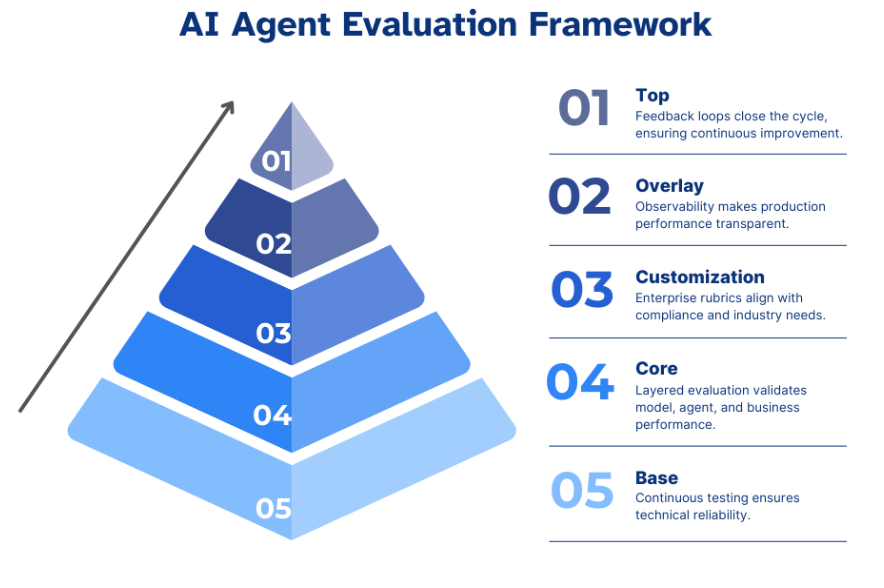
A superficial review might list features. A meaningful review explains how those features translate into outcomes.
1. Performance & Output Quality (Core Value Layer)
At the heart of any AI tool is output quality. This is the single most important factor because it directly impacts productivity.
For writing tools, this means:
- Logical structure and coherence
- Context awareness across long content
- Tone adaptability
For design tools:
- Visual consistency
- Relevance to prompt
- Usability of generated assets
For coding tools:
- Accuracy of syntax
- Logical correctness
- Security considerations
A key insight: high-performing AI tools reduce editing time, not just creation time. Tools that generate fast but require heavy correction often fail in real workflows.
2. User Experience & Cognitive Load
AI tools are meant to simplify work—but poorly designed interfaces can do the opposite.
Important factors include:
- How quickly a user understands the tool
- Whether workflows feel natural or forced
- The number of steps required to achieve results
Advanced tools often introduce complexity through excessive features. The best platforms balance power with clarity, allowing beginners to get started quickly while still offering depth for advanced users.
3. Feature Depth vs Feature Bloat
Many AI tools compete by adding features—but more features do not always mean better tools.
High-value features:
- Workflow automation
- Multi-step task execution
- Context retention
Low-value features:
- Redundant templates
- Cosmetic customization
- Gimmicky AI functions
The distinction between useful depth and feature bloat is critical in reviews.
4. Integration & Workflow Synergy
No tool exists in isolation. The real value emerges when tools connect.
A strong AI tool should:
- Integrate with productivity platforms (docs, communication tools)
- Support APIs or automation tools
- Fit naturally into existing workflows
For example, a writing tool that integrates directly into a CMS or document editor saves significantly more time than one that requires copy-paste workflows.
5. Pricing Psychology & ROI
AI tools often use subscription models, which can quickly accumulate.
A useful way to evaluate pricing:
- Does the tool save more time than it costs?
- Does it replace multiple tools?
- Is the free tier usable or just a demo?
High ROI tools often:
- Reduce manual work significantly
- Improve output quality
- Scale with usage
Deep Dive into AI Tool Categories

1. AI Writing & Content Creation Tools
AI writing tools are among the most mature and widely adopted. They are used for everything from blog posts and ad copy to scripts and documentation.
What makes a strong writing tool:
- Ability to maintain long-form coherence
- Tone and style adaptability
- SEO awareness (keywords, structure)
Real-world usage:
- Content marketers use them for scaling blog production
- Businesses use them for email and communication
- Creators use them for ideation and scripting
Limitations:
- Can produce generic content without strong prompts
- Requires human editing for nuance and originality
The best tools act as co-writers, not replacements.
2. AI Design & Creative Tools
Design tools powered by AI have dramatically lowered the barrier to entry for visual creation.
Strengths:
- Rapid generation of visual assets
- Accessibility for non-designers
- Template-driven workflows
Advanced capabilities:
- Brand consistency tools
- AI image generation
- Automated layout suggestions
Limitations:
- Less control compared to professional design software
- Output may lack uniqueness
These tools are best for speed and scalability, not always for high-end creative work.
3. AI Productivity & Automation Tools
This category focuses on eliminating repetitive work.
Core value:
- Automating workflows
- Reducing manual input
- Connecting multiple tools
Examples of use:
- Automatically summarizing meetings
- Triggering workflows based on events
- Managing task pipelines
Key insight:
The real power of these tools lies in compounding efficiency—small automations add up to massive time savings.
4. AI Coding & Development Tools
AI coding tools are transforming software development.
Capabilities:
- Code generation
- Debugging assistance
- Learning support
Impact:
- Faster development cycles
- Lower barrier for beginners
- Increased productivity for experienced developers
Challenges:
- Risk of incorrect or insecure code
- Over-reliance without understanding
These tools are best seen as augmented intelligence, not replacements for developers.
5. AI Data & Business Intelligence Tools
Data tools convert information into decisions.
Key strengths:
- Automated insights
- Predictive analytics
- Visualization dashboards
Use cases:
- Marketing performance tracking
- Sales forecasting
- Customer behavior analysis
Value:
These tools enable data-driven decision making, reducing reliance on guesswork.
6. AI Personal Assistants & Everyday Tools
These tools operate at the individual level.
Functions:
- Scheduling
- Task management
- Information retrieval
They enhance daily productivity by reducing cognitive load and organizing workflows.
In-Depth Review Methodology
A proper review goes beyond first impressions.
It should include:
- Long-term usage testing
- Cross-tool comparisons
- Real workflow integration
The goal is to answer:
Does this tool actually improve how work gets done?
Top Picks & Strategic Comparisons

Comparisons provide clarity in a crowded market.
Focus areas:
- Best overall tools
- Best niche tools
- Best value tools
Effective comparisons highlight trade-offs, not just features.
Common Problems & Hidden Downsides
AI tools are powerful—but not perfect.
Common issues:
- Inconsistent outputs
- Subscription overload
- Integration gaps
- Over-dependence
Understanding these helps users avoid unrealistic expectations.
Future Trends: Where AI Software Is Heading
The next phase of AI tools will include:
- Autonomous workflows
- Multi-modal capabilities
- Deeper personalization
- Seamless ecosystem integration
AI will shift from tool → assistant → system.
Buying Strategy: Building Your AI Stack
.png)
A smart approach:
- Start with 1–2 core tools
- Expand based on workflow needs
- Avoid tool overload
The goal is not to use more tools—but to build a cohesive system.
Conclusion
AI tools are redefining productivity at every level. But their real value lies not in their capabilities alone, but in how effectively they are integrated into daily workflows.
Choosing the right tools—and using them strategically—is what separates efficiency from overwhelm.