
Where you put your ads matters just as much as which ads you run. Two publishers using the same ad network, targeting the same niche, with identical traffic volumes can generate wildly different revenue - simply because one has optimized ad placement and the other has not.
Ad placement strategy is the discipline of deciding where ads appear on your pages, how many run simultaneously, which formats occupy each position, and how those decisions interact with user behavior to maximize both revenue and the experience that keeps visitors returning. Get it right and you can increase RPM by 40–150% without acquiring a single additional visitor. Get it wrong and you will simultaneously suppress revenue, increase bounce rates, trigger Google's intrusive interstitial penalties, and push users toward ad blockers.
In 2026, the stakes are higher than ever. Google's Core Web Vitals now directly influence both organic search rankings and programmatic ad demand quality scores. Premium advertisers using Google Ad Exchange set minimum viewability thresholds - meaning poorly placed ads not only earn less per impression, they actively suppress CPM bids across your entire inventory. Meanwhile, mobile traffic now accounts for over 70% of web sessions globally, demanding a mobile-first placement philosophy that many publishers still have not adopted.
This guide covers everything publishers need to know about ad placement strategies in 2026 - from foundational principles to advanced format-specific tactics - with actionable frameworks for every content type, device, and monetization goal.
Why Ad Placement Strategy Is the Highest-Leverage Optimization Available
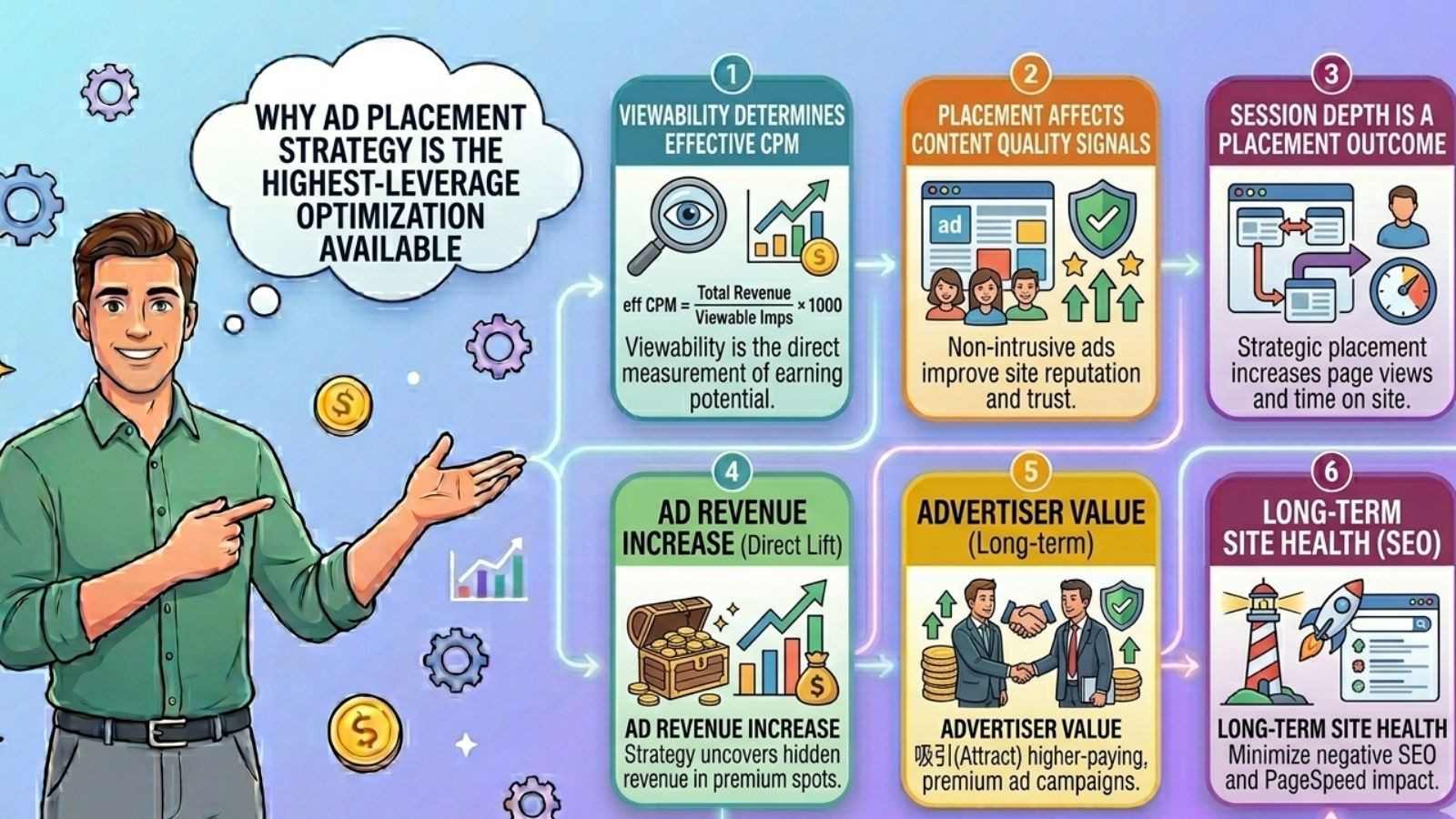
Before detailing specific strategies, it is worth understanding why placement matters so much in 2026's programmatic ecosystem.
Viewability determines your effective CPM. Ads that users actually have the opportunity to see are far more valuable to advertisers than those that are not. Publishers can charge higher prices for ad placements that consistently deliver high viewability scores. Viewability also helps expose potential ad fraud - abnormally low viewability scores can indicate hidden placements or bot traffic. When your viewability scores rise, premium demand sources in your header bidding stack begin bidding more aggressively on every impression across your site - not just the visible ones.
Placement affects content quality signals. Google's systems evaluate how prominently ads are placed relative to content. Pages where ads dominate above-the-fold space - pushing primary content below the fold - are flagged under Google's page layout algorithm and can see significant ranking penalties. Publishers who prioritize content above the fold and introduce ads naturally throughout the reading experience are rewarded with both better organic performance and higher advertiser confidence.
Session depth is a placement outcome. Users who encounter too many disruptive ads leave faster and view fewer pages. Users who encounter ads placed naturally within engaging content stay longer, scroll deeper, and generate more total impressions per session. Strategic placement multiplies revenue per visitor by increasing session quality - not just individual ad performance.
Strategic placement based on actual reading patterns lifts RPM more effectively than simply cramming units above the fold. This principle, confirmed consistently across publisher data, is the foundation of modern ad placement strategy.
The Core Principles of Ad Placement in 2026
Every effective placement strategy is built on four foundational principles. Violating any one of them will systematically undermine revenue, user experience, or both.
Principle 1 - Content first, ads second. Primary content must always be immediately accessible to the user. Prioritize your most valuable article content above the fold. Overloading the above-the-fold area with ads can harm user experience and drive visitors away. An ad that appears before users have received any value from your content will always underperform one that appears after the first paragraph of genuine value delivery.
Principle 2 - Viewability over density. A single highly viewable ad unit consistently outperforms three poorly positioned units. Ad density beyond the optimal threshold creates diminishing returns while accelerating the negative user experience signals that suppress both return visits and programmatic CPMs. Focus on fewer, better-positioned units rather than maximum unit count.
Principle 3 - Mobile and desktop are different experiences. A placement strategy optimized for desktop will almost certainly underperform on mobile - and vice versa. In 2026, with 70%+ of traffic arriving on mobile devices, mobile-first placement thinking is not optional. Each placement decision must be evaluated independently for both device contexts.
Principle 4 - Test systematically, never assume. Every site has a unique audience with unique reading patterns. What works on a finance site will not necessarily work on a food blog. What works on long-form guides may actively harm short-form content. Data-driven A/B testing is the only reliable way to determine which placements generate the optimal combination of viewability, CTR, and user experience for your specific audience.
The 8 Core Ad Placement Positions: A Complete Map
Understanding the standard placement positions - their strengths, limitations, and optimal use cases - is the foundation of any placement strategy.
Position 1: Above the Fold - Leaderboard / Billboard (728×90 / 970×250)
The above-the-fold leaderboard is one of the most coveted display positions because of its immediate visibility. Advertisers bid premium prices for guaranteed viewability.
Best practice in 2026: Place a 728×90 leaderboard (desktop) or 320×50 mobile banner immediately below your site navigation, above the article headline. This position captures the first impression of every visitor without displacing content. Avoid placing the leaderboard above the navigation - this pushes your brand identity and content below the fold and triggers Google's page layout algorithm.
Revenue potential: High. Above-fold positions consistently achieve 80–90% viewability rates when properly positioned, qualifying them for premium programmatic demand.
Caution: Resist the temptation to stack multiple above-fold units. One above-fold unit + content + first in-content unit is the optimal above-fold architecture for most content sites.
Position 2: In-Content After First Paragraph (300×250 / Responsive)
The in-content unit placed after the first or second paragraph is consistently the highest-performing placement for RPM on long-form content sites. This position catches readers at peak attention - early in the article, engaged with the topic, and still in active reading mode.
Optimize ad placement especially after the first paragraph - this single advice, validated repeatedly across publisher networks, reflects a fundamental insight about reading behavior: the moments immediately after a reader commits to an article are when attention is highest and ad interaction most natural.
Best practice in 2026: Use a responsive display unit that adjusts size based on available viewport width. On desktop, this typically renders as 300×250 or 336×280. On mobile, it renders as 320×100 or 320×50. Responsive units achieve higher fill rates than fixed-size units by entering more ad size auctions simultaneously.
Revenue potential: Very high. This position typically generates the highest single-unit RPM on content pages across most niches.
Position 3: In-Content Mid-Article (300×250 / Native)
A second in-content placement positioned at the midpoint of long-form articles - typically after the 4th–6th paragraph or at the 50% scroll depth mark - captures readers who are deeply engaged with the content and have demonstrated intent to read through the full article.
Best practice in 2026: Place this unit at a natural content break - end of a section, before a subheading, or after a key data point. Users are most receptive to ads at natural pauses in their reading flow. Forcing an ad mid-sentence or mid-argument creates friction that increases bounce signals.
Revenue potential: High. Second only to the post-first-paragraph unit for in-content RPM. On articles over 1,200 words, this placement is consistently justified by session engagement data.
Position 4: Sticky Sidebar (300×250 / 160×600)
The sticky sidebar unit is a display ad that scrolls with the user - remaining in view throughout the entire page session. Sticky ads in the sidebar or at the bottom of the page can improve viewability and engagement significantly.
Best practice in 2026: Use JavaScript to make the sidebar unit sticky once it reaches a fixed offset from the top of the page. Combine a 300×250 and a 300×600 in a sidebar that becomes sticky after the user scrolls past the leaderboard. This maintains viewability even for users who scroll 80%+ through a long article.
Revenue potential: Very high. Sticky units achieve the highest sustained viewability rates of any desktop placement - often 70–85% - which directly commands premium programmatic bids.
Limitation: Sidebar units only work on desktop layouts. Mobile devices typically do not have sidebar space, making this a desktop-only strategy.
Position 5: Sticky Footer / Header (Mobile)
On mobile devices, the equivalent of the desktop sticky sidebar is the sticky footer unit - a fixed 320×50 or 320×100 banner anchored to the bottom of the mobile viewport that scrolls with the user.
Sticky footer ads on mobile achieve the highest viewability rates of any mobile format, because the unit remains visible throughout the session regardless of scroll position. This makes them exceptionally attractive to programmatic buyers who require minimum viewability standards.
Best practice in 2026: Implement mobile sticky footer units with a slight delay - show them after the user has scrolled 25% down the page, indicating genuine reading intent rather than an accidental pageload. This reduces user friction while maintaining viewability for the overwhelming majority of engaged sessions.
Revenue potential: Very high for mobile traffic. Mobile sticky footer units can generate 30–50% of total mobile RPM despite being a single small unit, because their sustained viewability commands premium bids on every impression.
Position 6: Below-the-Fold In-Content (300×250)
Additional in-content units positioned deeper in long-form articles - after the 6th–8th paragraph or at the 70–80% scroll depth - capture readers who have demonstrated strong reading intent through deep scroll behavior.
Best practice in 2026: Implement lazy loading for all below-fold placements. Lazy loading ensures that below-fold ads only load when the user is actually about to scroll into their viewport - improving page speed for the majority of users who never scroll that deep, while ensuring those who do encounter properly loaded ads.
Revenue potential: Medium. These units serve fewer impressions than above-fold and mid-content units, but the users who encounter them have demonstrated the highest reading intent - which can translate to higher CTR in CPC-weighted inventory.
Position 7: End-of-Article / Recirculation Zone
The end of an article is a natural decision point for readers - they have finished the content and are choosing what to do next. Placing ads and content recommendations at this position captures a uniquely receptive moment.
Best practice in 2026: Combine a 300×250 display unit with a native content recommendation widget (from Taboola, Outbrain, or similar) immediately after the conclusion. The display unit captures direct ad revenue while the content recommendation widget increases session depth by driving readers to additional pages - improving both total impressions per session and the engagement signals that boost organic rankings.
Revenue potential: Medium. Lower absolute viewability than above-fold positions, but high CTR due to reader decision-state and low competition with other units on the page.
Position 8: Interstitial and Anchor Ads (Mobile)
Interstitial ads - full-screen ads that appear at natural transition points - can generate high CPMs but must be deployed extremely carefully. Google penalizes intrusive interstitials that appear immediately after a mobile user navigates to a page from search results.
Best practice in 2026: If using interstitials, deploy them only at natural session transitions: between articles (not on first page load), after a user completes a defined interaction (downloads a resource, submits a form), or at minimum after the user has spent 30+ seconds on the current page. Never show interstitials immediately on page load from organic search - this triggers Google's mobile interstitial penalty and can result in significant ranking losses.
Revenue potential: High when used correctly. Very high risk when misused.
Ad Placement Strategy by Content Type
Different content formats require fundamentally different placement architectures. A placement strategy optimized for a 2,500-word guide article will actively harm a 400-word news brief or a recipe page.
Long-Form Articles (1,200+ words)
Recommended placement stack:
- Leaderboard below navigation (above fold)
- In-content after paragraph 2 - highest priority unit
- In-content at article midpoint (paragraph 5–7)
- Sticky sidebar (desktop only)
- Mobile sticky footer
- Below-fold in-content at 70% scroll depth
- End-of-article + recirculation zone
Total units: 4–6 depending on article length, with 3 active in any single viewport at once maximum.
Key consideration: Long-form articles justify the highest ad density of any content type because session times are long, scroll depth is high, and readers have explicitly chosen to invest time in the content - signaling intent that advertisers value.
Ad Format Performance Comparison (2026)
| Ad Format | Avg. Viewability | Relative CPM | Best Position | Mobile Compatible |
|---|---|---|---|---|
| Sticky Sidebar (Desktop) | 75–85% | Very High | Sidebar scroll | ❌ Desktop only |
| Mobile Sticky Footer | 70–80% | Very High | Bottom viewport | ✅ Mobile only |
| In-Content (Post Para 2) | 65–80% | High | In article | ✅ Both |
| Outstream Video | 60–75% | Very High | In-content | ✅ Both |
| Leaderboard (ATF) | 55–75% | High | Below nav | ✅ Both |
| Native / In-Feed | 50–70% | Medium–High | Between content | ✅ Both |
| Below-Fold In-Content | 40–65% | Medium | Deep scroll | ✅ Both |
| Standard Banner (BTF) | 25–45% | Low–Medium | Footer area | ✅ Both |
| Interstitial | 90%+ | Very High | Transition points | ✅ Both (strict rules) |
Step-by-Step: Building Your Ad Placement Strategy from Scratch
Step 1: Audit Your Current Placement Performance Before making any changes, establish baselines. In Google AdSense or Google Ad Manager, generate a performance report filtered by individual ad unit. Record RPM, viewability percentage, CTR, and impressions per unit. Identify your top-performing placements and your underperformers. Low viewability - under 50% - is usually where the opportunity lies. Focus only on placements with meaningful traffic volume; units with negligible impressions may be cached and not indicative of live inventory.
Step 2: Map Your Page Layout by Device Create simple wireframe sketches of your page layout on desktop and mobile. Mark where content appears, where navigation sits, where natural content breaks occur, and where current ad units are placed. This visual mapping reveals opportunities - natural break points without ads - and problems - ad stacking in single viewports.
Step 3: Define Your Priority Placements Based on your content type, identify your 3–4 highest-priority placements. For most content sites: the in-content post-paragraph-2 unit, the sticky sidebar or mobile sticky footer, and the leaderboard below navigation. These three placements alone should generate 70–80% of your total ad revenue when properly optimized.
Step 4: Configure Responsive Ad Units Replace any fixed-size ad units with responsive display units. Responsive units automatically enter auctions for multiple ad sizes, increasing fill rates and ensuring your inventory reaches the maximum number of potential buyers. Configure each responsive unit with explicit size suggestions - preferred sizes that render best in each placement - to guide the algorithm without restricting it.
Step 5: Implement Lazy Loading for Below-Fold Units Apply lazy loading to every ad unit positioned below the initial viewport. This improves page speed for users who do not scroll deep - maintaining your Core Web Vitals scores - while ensuring ads load correctly for users who do. Lazy loading below-fold ads typically improves LCP scores by 15–40% compared to loading all ad units simultaneously on page load.
Step 6: Set Up A/B Tests for Key Placements Run controlled A/B tests on your highest-traffic pages. Test one variable at a time: placement position (after paragraph 2 vs. after paragraph 4), unit size (300×250 vs. 336×280), or format type (display vs. native). Run each test for a minimum of 7 days with at least 1,000 impressions per variant before evaluating results. Document findings systematically - this data becomes your placement optimization library over time.
Step 7: Implement Mobile-Specific Placement Overrides Use responsive design breakpoints or a Content Management System's device-targeting capability to serve mobile-specific placement configurations. The desktop sticky sidebar should be hidden on mobile and replaced with the mobile sticky footer. Above-fold leaderboard (728×90) should be replaced with a mobile banner (320×50 or 320×100). In-content units should use mobile-appropriate sizes that do not exceed the device viewport width.
Step 8: Monitor Continuously and Iterate Monthly Ad placement performance is not static - user behavior evolves, content formats change, and programmatic demand patterns shift seasonally. Establish a monthly review cadence where you examine viewability scores, RPM by placement, and fill rates across your top-performing pages. Pause placements with consistently low viewability and reinvest that inventory into your highest-performing positions.
Who Benefits Most from Each Placement Strategy?
✅ In-Content Placement Stack Is Best For:
- Long-form content sites - blogs, guides, tutorials, comparison articles
- Any publisher where users engage with full articles rather than scanning and leaving
- Sites where session times exceed 2 minutes on average
✅ Sticky Sidebar / Mobile Footer Stack Is Best For:
- Any site with long scroll depth regardless of content type
- Publishers with high mobile traffic percentages (70%+)
- Sites targeting US and UK audiences where sticky format premiums are highest
✅ Native / In-Feed Placement Is Best For:
- Category and archive pages with article listing formats
- Publishers who prioritize user experience and want minimal disruption
- Sites where direct advertiser relationships and brand safety are important
✅ Video / Outstream Placement Is Best For:
- Content sites covering topics with naturally visual elements (food, travel, fitness, tech)
- Publishers in high-CPM niches where outstream video premiums are most significant
- Sites with strong mobile engagement where outstream video performs best
Common Ad Placement Mistakes Publishers Make in 2026
Mistake 1: Stacking multiple ads above the fold Placing more than one ad unit in the above-fold viewport pushes primary content below the fold, triggers Google's page layout algorithm, and signals low-quality inventory to programmatic buyers - suppressing CPMs across the entire site.
Mistake 2: Ignoring mobile placement entirely Using desktop-only placement configurations on a site with 70% mobile traffic means the majority of your impressions are served with suboptimal placement architecture. Mobile requires its own placement strategy, not a shrunk desktop version.
Mistake 3: Running too many ad units on short content Short articles with 5+ ad units typically generate lower total revenue than the same content with 2–3 well-placed units, because aggressive ad density on short content increases bounce rates and reduces the session depth that multiplies per-visitor revenue.
Mistake 4: Never A/B testing placements Publishers who set their placement configuration once and never revisit it are leaving significant money on the table. Audience behavior evolves, content formats change, and placement performance shifts. Monthly review and quarterly A/B testing are minimum maintenance requirements for a well-optimized placement strategy.
Mistake 5: Prioritizing impressions over viewability Maximizing the number of ad units served per page - at the expense of viewability - generates lower effective CPMs than fewer, highly viewable units. Premium programmatic buyers require minimum 50–70% viewability thresholds; inventory that falls below these thresholds is excluded from their campaigns, permanently reducing your addressable demand pool.
Frequently Asked Questions (FAQ)
Q: How many ads per page is optimal in 2026? For long-form content (1,200+ words), 4–6 ad units is optimal for most sites. For short-form content (under 800 words), 2–3 units is the recommended ceiling. Beyond these thresholds, each additional unit typically generates diminishing revenue returns while meaningfully increasing page load time and user friction. Always evaluate total session RPM - not just page RPM - when assessing the impact of adding units, because reducing session depth through excessive ads can offset any per-page gains.
Q: Should ads appear above or below the content? Both - but strategically. One leaderboard unit above the content (below navigation, not above it) is appropriate and expected by users. In-content placements throughout the article body generate the highest RPM of any position. The key rule: primary content must be immediately visible to users without scrolling - ads should enhance the reading experience, not gate it.
Q: Does ad placement affect SEO rankings? Yes, directly. Google's page layout algorithm penalizes pages where ads dominate above-the-fold space. Google's Core Web Vitals - particularly Cumulative Layout Shift (CLS) and Largest Contentful Paint (LCP) - are directly affected by how ads load and where they appear. Ad-heavy pages with poor CWV scores can see meaningful ranking suppression. Publishers who optimize both placement and page speed simultaneously protect their organic traffic - the highest-quality traffic for programmatic ad revenue.
Q: What is the best ad size for in-content placement? Responsive ad units that render across multiple sizes are the best default configuration. If you need to specify preferred sizes: 300×250 (medium rectangle) is the highest-demand size in programmatic advertising globally - the widest pool of advertisers bid on this format. 336×280 (large rectangle) often achieves slightly higher CPMs where supported. 300×600 (half-page) achieves the highest CPMs of any standard display format but requires sufficient content width to accommodate it without disrupting layout.
Q: How do I measure whether my ad placement changes are working? Track three metrics per placement change: Active View Viewability % (target: 60%+), placement RPM (revenue per 1,000 impressions for that specific unit), and site-wide session RPM (to detect whether per-page gains are being offset by session depth losses). Run changes for at least one week with sufficient sample size before evaluating. Isolate one variable per test - simultaneous changes make it impossible to attribute performance differences to specific placements.
Q: Does Google AdSense limit how many ads I can place? Google removed its previous three-ads-per-page limit in 2016, replacing it with a quality guideline: publishers should only place as many ads as can be supported by the content on the page. In practice, this means that ad density should be proportional to content length and that ads should never outweigh content in the overall page composition. Excessive ad density remains a violation of AdSense policies even without a specific numerical cap.

Final Verdict: Ad Placement Strategy in 2026
Ad placement is not a one-time configuration decision - it is an ongoing optimization discipline that compounds over time. Publishers who treat placement as dynamic, data-driven, and device-specific consistently outperform those who implement a placement configuration once and leave it unchanged.
The publishers generating the highest RPM in 2026 are not necessarily those with the most ads on the page. They are the ones who have identified the precise placements where their specific audience is most engaged, configured those placements to achieve maximum viewability, and built their content and page architecture around delivering genuine value that makes users want to stay - generating the session depth and engagement signals that premium advertisers pay the most to reach.
The foundational placement stack - in-content post-paragraph-2 unit, sticky sidebar on desktop, mobile sticky footer, and a natural end-of-article position - delivers 80% of optimal placement results for most content sites. From that foundation, systematic A/B testing identifies the site-specific optimizations that push from 80% to 95% of potential. That final 15% gap often represents thousands of dollars per month in recovered revenue from traffic you are already generating.
For publishers focused on scaling sustainable ad revenue, the right monetization strategy goes far beyond simply adding more ads. At advanced publisher monetization guides, you can explore in-depth resources on RPM optimization, header bidding, ad network comparisons, demand diversification, and high-performing monetization frameworks built for modern publishers.
If you’re optimizing your monetization stack in 2026 and want to better understand how ad placement strategy connects with viewability, niche selection, and programmatic performance, the expert insights available in the publisher revenue optimization resources provide actionable frameworks designed to help publishers increase total revenue per visitor - not just revenue per impression.
Ready to build a stronger monetization strategy for 2026? Visit the AdsCollab contact page to connect with the team and get personalized recommendations tailored to your website and growth goals.

